
What is the recurring engine?
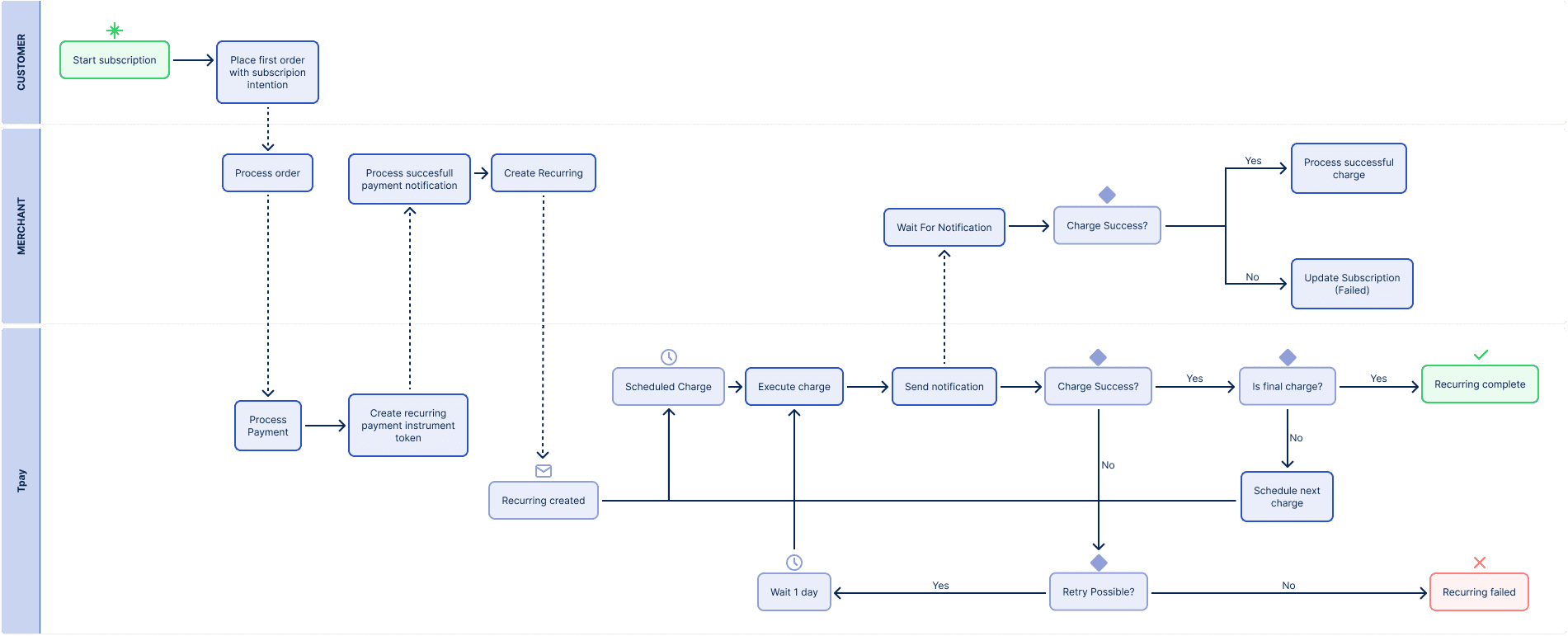
The recurring engine is a solution that enables automated management of recurring payments. It automatically charges payments according to a defined schedule, retries failed attempts to increase collection success, and sends notifications about payment status.
It is particularly useful for:
- subscriptions (e.g. VOD, SaaS, fitness)
- recurring billing (utilities, memberships)
- installment payments
How does the recurring engine work?
- The Merchant creates a recurring payment
- The system stores the schedule
- A payment attempt is executed at the scheduled time
- If a payment fails, the system retries the charge according to the default retry policy or a custom retry schedule configured by the Merchant
- The Merchant receives a webhook with the result
By default, the system retries failed charges once per day for up to 14 days.
A custom retry schedule can be configured using the schedule.retryIntervals field when creating a recurring payment.
Responsibility split
The recurring engine provides backend functionality (API).
The Merchant is responsible for the UI and business logic.
Merchant responsibilities:
- obtaining a token/alias (e.g. via the first payment)
- initializing recurring payments
- handling notifications
- managing subscriptions (cancellation or payment method updates)
Tpay responsibilities:
- processing payments
- retrying failed attempts
- managing the payment schedule
Before you start
Make sure that you:
- Have authorization credentials
- Have implemented card tokenization or BLIK recurring payments
- Handle transaction notifications
Dictionaries
Recurring status
| Value | Description |
|---|---|
active | Recurring is active and will continue executing charges |
finished | Recurring has ended (charge limit reached) |
failed | Recurring has ended due to failure |
canceled | Recurring was canceled by the Merchant |
Payment status
| Value | Description |
|---|---|
pending | Payment is being processed |
correct | Payment completed successfully |
failed | Payment failed |
canceled | Payment was canceled |
Failure reasons
| Value | Description |
|---|---|
insufficient funds | Insufficient funds on the payer's account |
instrument invalid | Payment instrument is invalid or expired |
instrument rejected | Payment instrument was rejected by the provider |
payer rejected | Payment was rejected by the payer |
internal error | Internal system error occurred |
Create recurring payment
To create a recurring payment, send a POST request to:
https://api.tpay.com/recurring
See details in API Reference: POST /recurring
Provide the following parameters in the request:
id * | unique ULID identifying the recurring payment |
description * | transaction description visible to the payer |
hiddenDescription | technical description not visible to the payer |
payer.email * | payer’s email address |
payer.name * | payer’s full name |
payer.phone | phone number (with country code) |
payer.address | street and building number |
payer.code | postal/zip code |
payer.city | city |
payer.country | country |
payer.taxId | tax identification number |
schedule.amount * | single charge amount |
schedule.currency * | currency (PLN) |
schedule.firstChargeDate * | date of the first charge |
schedule.interval * | number of days/months between charges |
schedule.intervalType * | days or months |
schedule.chargeCount | number of charges to be performed. Passing null means charges will continue until canceled |
schedule.retryIntervals | Optional custom retry schedule for failed charges. Each interval defines the delay before the next retry attempt. If provided, it overrides the default retry policy. |
paymentInstrument.paymentType * | card_token or blik_payid |
paymentInstrument.value * | card token / BLIK alias |
paymentInstrument.blik.model | BLIK model (A, M, O) |
paymentInstrument.blik.noDelay | charge without delay (only for A and O models) |
callbackUrl * | endpoint that will receive notifications |
* Required fields
Request body example
{
  "id": "01K1Z6T40ZWKY1XZG9VD5AZ9Q4",
  "description": "Recurring Order AB-CD-12",
  "hiddenDescription": "1234-ABC-89",
  "payer": {
    "email": "[email protected]",
    "name": "Jan Kowalski",
    "phone": "00123456",
    "address": "ul. Przykładowa 44b/2",
    "code": "00-001",
    "city": "Warszawa",
    "country": "PL",
    "taxId": "PL3774716081"
  },
  "schedule": {
    "amount": 12.34,
    "currency": "PLN",
    "firstChargeDate": "2025-11-12T12:34:00+02:00",
    "interval": 1,
    "intervalType": "months",
    "chargeCount": 12
  },
  "paymentInstrument": {
    "paymentType": "blik_payid",
    "value": "alias_123",
    "blik": {
      "model": "A",
      "noDelay": true
    }
  },
  "callbackUrl": "https://your-callback-url"
}
Example:
curl --location 'https://api.tpay.com/recurring' \
--header 'Content-Type: application/json' \
--header 'Authorization: Bearer <access_token>' \
--data-raw '{
  "id": "01K1Z6T40ZWKY1XZG9VD5AZ9Q4",
  "description": "Recurring Order AB-CD-12",
  "hiddenDescription": "1234-ABC-89",
  "payer": {
    "email": "[email protected]",
    "name": "Jan Kowalski",
    "phone": "00123456",
    "address": "ul. Przykładowa 44b/2",
    "code": "00-001",
    "city": "Warszawa",
    "country": "PL",
    "taxId": "PL3774716081"
  },
  "schedule": {
    "amount": 12.34,
    "currency": "PLN",
    "firstChargeDate": "2025-11-12T12:34:00+02:00",
    "interval": 1,
    "intervalType": "months",
    "chargeCount": 12
  },
  "paymentInstrument": {
    "paymentType": "card_token",
    "value": "token_123"
  },
  "callbackUrl": "https://your-callback-url"
}'
Example response:
The recurring creation endpoint may return different statuses depending on the situation:
| HTTP Status | Description |
|---|---|
201 Created | Recurring payment was successfully created |
200 OK | Recurring with the given ID already exists and data matches (idempotent) |
409 Conflict | Recurring with the given ID already exists but data differs |
400 Bad Request | Invalid input data (validation error) |
401 Unauthorized | Invalid authorization credentials |
404 Not Found | Recurring exists but does not belong to the specified Merchant |
500 Internal Server Error | Server error |
Recurring creation is an idempotent operation.
Scenario:
- first request → 201 Created
- retrying the same request → 200 OK
- same ID with different data → 409 Conflict
This allows you to safely retry requests (e.g. after a timeout).
Custom Retry Schedule
By default, the recurring engine uses a retry policy that retries failed charges once per day for up to 14 days.
A Merchant may define a custom retry schedule for a specific recurring payment by providing the schedule.retryIntervals field.
Each item in the array defines the delay before the next retry attempt after a failed charge.
Example:
The above configuration means:
- first retry after 10 minutes
- second retry after 12 hours
- third retry after 1 day
Once all configured retry attempts have been exhausted, no further retry attempts will be scheduled.
If the retryIntervals field is not provided, the default retry policy will be applied.
The maximum number of configured retry attempts is 30.
Fetch recurring payment
To retrieve recurring payment details, send a GET request to:
https://api.tpay.com/recurring/{recurringId}
Replace {recurringId} with your recurring identifier:
https://api.tpay.com/recurring/01K1Z6T40ZWKY1XZG9VD5AZ9Q4
See details in API Reference: GET /recurring/{recurringId}
Example request
Example response
{
  "id": "01K1Z6T40ZWKY1XZG9VD5AZ9Q4",
  "description": "Recurring Order AB-CD-12",
  "hiddenDescription": "1234-ABC-89",
  "status": "active",
  "payer": {
    "email": "[email protected]",
    "name": "Jan Kowalski"
  },
  "schedule": {
    "amount": 12.34,
    "currency": "PLN",
    "interval": 1,
    "intervalType": "months",
    "chargeCount": 12
  },
  "paymentInstrument": {
    "paymentType": "card_token"
  },
  "callbackUrl": "https://your-callback-url",
  "reason": "insufficient funds"
}
The reason field is returned only if the last payment attempt failed.
Fetch recurring transactions
To retrieve a list of all payment attempts (transactions) for a given recurring payment, send a GET request to:
https://api.tpay.com/recurring/{recurringId}/transactions
Replace {recurringId} with your recurring identifier:
https://api.tpay.com/recurring/01K1Z6T40ZWKY1XZG9VD5AZ9Q4/transactions
See details in API Reference: GET /recurring/{recurringId}/transactions
Example request
Example response
{
  "items": [
    {
      "transactionId": "01KC92SARJB28QM9SCHBXFRENH",
      "createdAt": "2025-11-12T12:34:00+02:00",
      "status": "correct",
      "iterationCount": 1,
      "iterationAttemptCount": 1,
      "reason": null
    },
    {
      "transactionId": "01KC93C3XD55XV39JQAQQY20R4",
      "createdAt": "2025-12-12T12:34:00+02:00",
      "status": "failed",
      "iterationCount": 2,
      "iterationAttemptCount": 1,
      "reason": "insufficient funds"
    },
    {
      "transactionId": "01KC93C8PDVNK9F9NTW9KPPQTP",
      "createdAt": "2025-12-13T12:34:00+02:00",
      "status": "pending",
      "iterationCount": 2,
      "iterationAttemptCount": 2,
      "reason": null
    }
  ]
}
| Field | Description |
|---|---|
transactionId | Identifier of a single transaction in Tpay. |
createdAt | Date and time when the payment attempt was created. |
status | Status of the payment attempt. |
iterationCount | Sequential number of the charge within the schedule. |
iterationAttemptCount | Attempt number within a given charge iteration. |
reason | Reason for failure (if applicable). |
Each payment (iteration) can have multiple attempts (iterationAttempt).
Example:
Iteration 2:
iterationAttempt 1 → FAILED
iterationAttempt 2 → FAILED
iterationAttempt 3 → SUCCESS
Retry recurring payment
This endpoint allows you to immediately retry the last failed payment attempt for a recurring payment.
Retry enables forcing another payment attempt outside of the standard schedule.
It can be used in scenarios such as:
- the customer has added funds
- the customer requested another payment attempt
- the Merchant wants to speed up the retry process
To retry the last failed attempt, send a POST request to:
https://api.tpay.com/recurring/{recurringId}/retry
Replace {recurringId} with your recurring identifier:
https://api.tpay.com/recurring/01K1Z6T40ZWKY1XZG9VD5AZ9Q4/retry
See details in API Reference: POST /recurring/{recurringId}/retry
Execution conditions
Retry will be performed only if:
- the recurring status is active
- the last attempt status is failed
- the maximum number of retry attempts has not been exceeded
Example
Example response
Response statuses
- 201 – retry has been successfully scheduled
- 404 – recurring not found or access denied
- 406 – recurring is not active or the last attempt was not failed
- retry creates a new payment attempt
- retry is processed asynchronously
- retry does not modify the schedule
- retry does not affect future billing cycles
Cancel recurring payment
This endpoint allows you to cancel an active recurring payment.
When to use?
Use this endpoint when:
- the customer has canceled the service
- the subscription has expired
- you want to stop further charges
After cancellation:
- no further payments will be executed
- retry attempts are stopped
- the schedule is no longer active
To cancel a recurring payment, send a POST request to:
https://api.tpay.com/recurring/{recurringId}/cancel
Replace {recurringId} with your recurring identifier:
https://api.tpay.com/recurring/01K1Z6T40ZWKY1XZG9VD5AZ9Q4/cancel
See details in API Reference: POST /recurring/{recurringId}/cancel
Example
Example response
Response statuses
- 200 – recurring has been successfully canceled
- 401 – unauthorized
- 404 – recurring not found or access denied
- 500 – internal server error
- cancellation stops all future payments
- retry for the current payment is stopped
- cancellation does not revert already completed payments
Update payment instrument
This endpoint allows you to update the payment instrument for an existing recurring payment.
It can be used to:
- replace a card
- change a BLIK alias
- restore payments after a rejection
To update the payment method, send a POST request to:
https://api.tpay.com/recurring/{recurringId}/payment_instrument
Replace {recurringId} with your recurring identifier:
https://api.tpay.com/recurring/01K1Z6T40ZWKY1XZG9VD5AZ9Q4/payment_instrument
See details in API Reference: POST /recurring/{recurringId}/payment_instrument
Specify the following parameters in the request:
paymentInstrument.paymentType * | card_token or blik_payid |
paymentInstrument.value * | card token / BLIK alias |
paymentInstrument.blik.model | BLIK model (A, M, O) |
paymentInstrument.blik.noDelay | charge without delay (only for models A and O) |
* Required fields.
The basic request body should look like this:
Example
curl --location --request POST 'https://api.tpay.com/recurring/01K1Z6T40ZWKY1XZG9VD5AZ9Q4/payment_instrument' \
--header 'Authorization: Bearer <access_token>' \
--header 'X-Merchant-Id: 01HXXX' \
--header 'Content-Type: application/json' \
--data-raw '{
  "paymentInstrument": {
    "paymentType": "card_token",
    "value": "token_123456",
  }
}'
Example response
Response statuses
- 201 – payment instrument successfully updated
- 400 – invalid request data
- 401 – unauthorized
- 404 – recurring not found
- 500 – internal server error
- the change applies to future payments
- retry will use the updated instrument
- the operation is processed asynchronously
Notification
After each payment attempt, the system sends a notification (webhook) to the callbackUrl defined by the Merchant.
The notification contains details about the payment attempt.
Notifications are sent:
- after each payment attempt
- regardless of the result (success / failed)
Notifications allow you to:
- update subscription status on the Merchant side
- inform users about payment issues
- react to successful payments (e.g. activate a service)
Notification structure:
| Field | Description |
|---|---|
recurringId | Recurring payment identifier. |
transactionId | Identifier of a single transaction (attempt). |
hiddenDescription | Technical description provided during recurring creation. |
iterationCount | Sequential number of the charge within the schedule. |
iterationAttemptCount | Attempt number for a given charge. |
status | Payment status. |
nextChargeDate | Date of the next payment attempt. May be null if no further attempts are scheduled (recurring finished). |
reason | Reason for failure (if applicable). |
How to respond to a notification?
To confirm successful receipt of a notification, return:
HTTP Code: 200
Body:
Notifications may be sent multiple times.
If the message is not received or the response content is different, we will retry according to the scheme.